
ComfyUI Is Code You Can See
A detailed look at typed node graphs, Python-backed execution, caching, workflow JSON, and why visual programming works so well for creative AI.
In this article
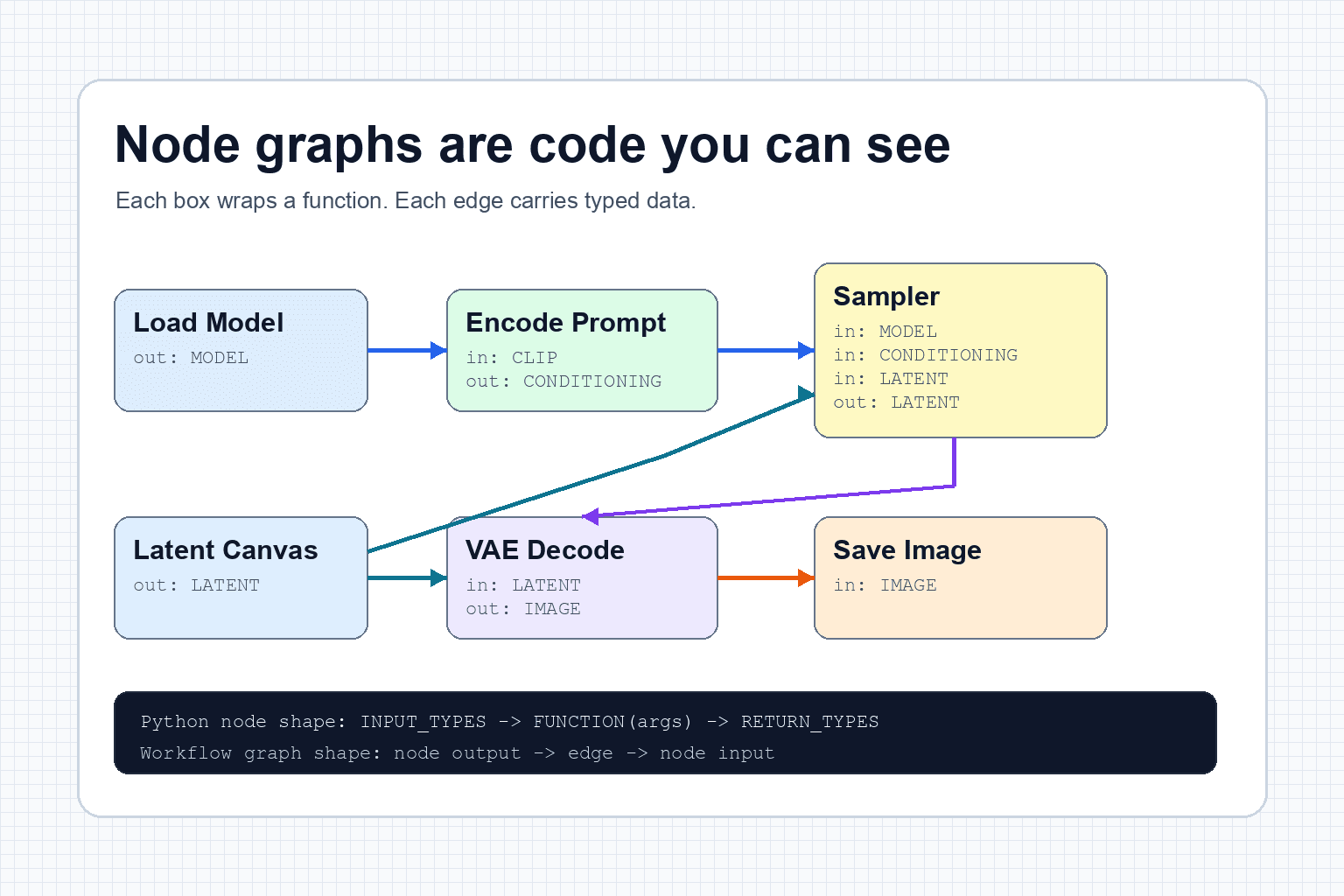
The short version
ComfyUI looks like a canvas of boxes and wires, but underneath that visual surface is a structured dataflow program. In ComfyUI's classic server API, an execution node is usually backed by a Python class with declared inputs, declared outputs, and a named method. Browser extensions and newer node APIs can also contain JavaScript or TypeScript, so "every node is one Python function" is a useful first approximation, not a universal rule.
The basic translation is simple:
- A node is a function or object with parameters.
- An input socket is a typed argument.
- An output socket is a typed return value.
- An edge is data moving from one return value into another argument.
- The workflow is a directed graph that tells the executor which outputs depend on which inputs.
- The position of a node on the canvas helps the reader, but it does not determine execution order.
Node-graph intuition
Why this works so well
Node software works because it makes structure visible. In plain code, the user has to infer the pipeline from function calls, variable names, file paths, and control flow. In a node graph, the shape of the computation is on screen.
That visual shape solves several problems at once:
- The data path is visible. You can see where the model, prompt, latent, image, or mask goes.
- The workflow is modular. You can replace one sampler, one model loader, or one resize step.
- The graph is inspectable. A broken edge or wrong datatype is easier to spot than a hidden variable bug.
- The result is reusable. A saved graph becomes a shareable production recipe.
- The interface invites experimentation. Users can branch, bypass, compare, and duplicate parts of the workflow.
This is why ComfyUI feels technical but still creative. It does not hide the machine. It gives the machine a readable map.
What a ComfyUI node really is
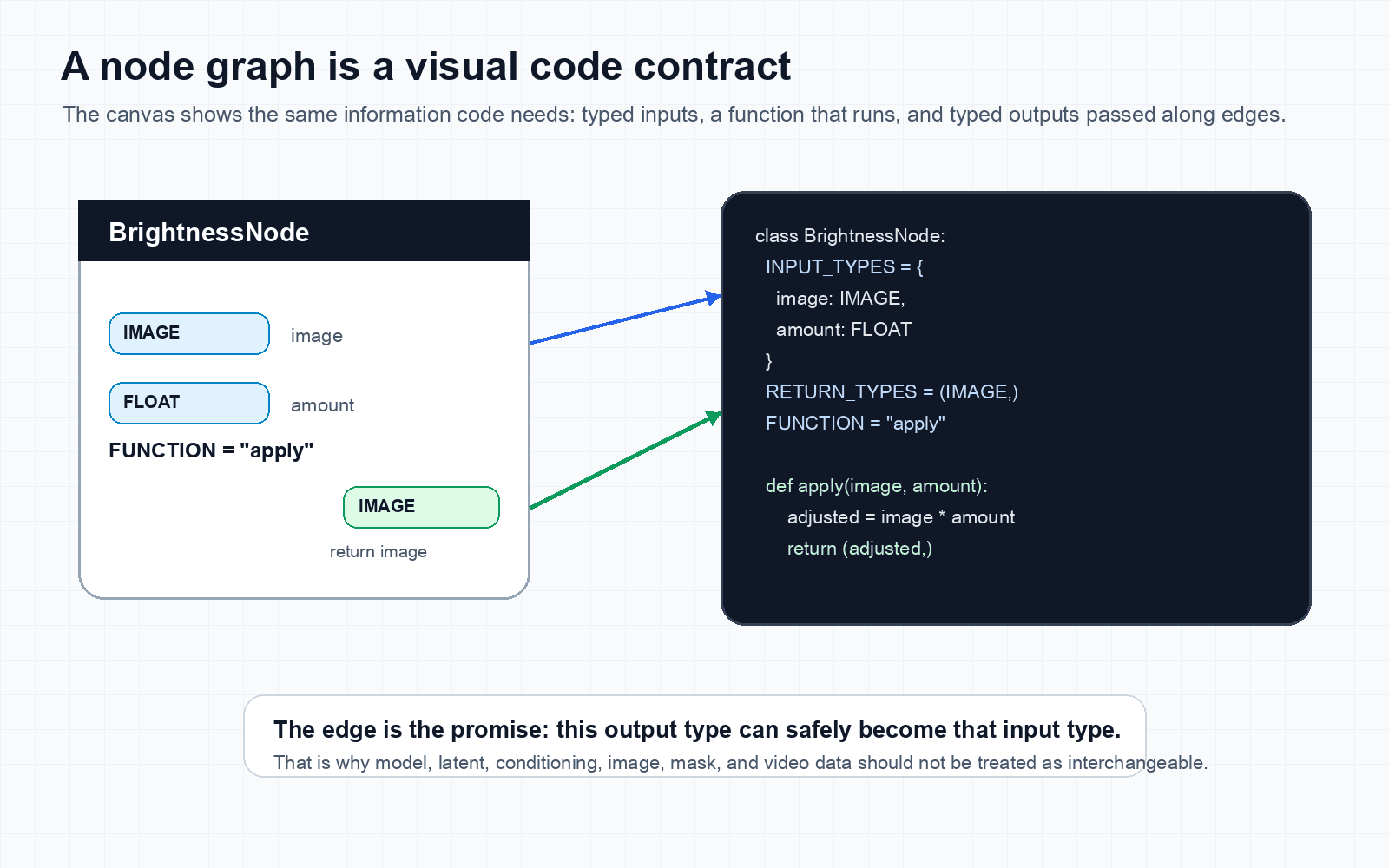
The classic ComfyUI custom node interface describes a server-side node as a Python class with properties such as INPUT_TYPES,RETURN_TYPES, andFUNCTION. The function receives named inputs and returns a tuple that matches the declared output types.
Some nodes only transform data. Others load resources, write files, or expose output to the user. That distinction matters during execution: ComfyUI starts from requested output nodes and resolves the upstream values they need.
A simplified custom node can be imagined like this:
class BrightnessNode:
    @classmethod
    def INPUT_TYPES(cls):
        return {
            "required": {
                "image": ("IMAGE", {}),
                "amount": ("FLOAT", {"default": 1.0}),
            }
        }

    RETURN_TYPES = ("IMAGE",)
    RETURN_NAMES = ("image",)
    FUNCTION = "apply"
    CATEGORY = "examples"

    def apply(self, image, amount):
        adjusted = image * amount
        return (adjusted,)
On the canvas, that code becomes a box:
BrightnessNode

inputs:
  image  : IMAGE
  amount : FLOAT

output:
  image  : IMAGE

run:
  apply(image, amount)
The node UI is not separate from the code. It is a form generated from the code contract. The reason an edge can connect or fail to connect is that the system knows the declared data types. A frontend extension may add richer controls, previews, or behavior around that contract.
Type-safety intuition
Edges are data contracts
The edge is the important part people often underestimate. It is not only a line. It is a promise that the output of one node is suitable input for another node.
In an AI image workflow, those contracts might look like this:
Load Diffusion Model  -> MODEL        -> Sampler
Text Encoder          -> CONDITIONING -> Sampler
Empty Latent Image    -> LATENT       -> Sampler
Sampler               -> LATENT       -> VAE Decode
VAE Decode            -> IMAGE        -> Save Image
If that same workflow were written as ordinary code, it might look more like this:
model = load_model("z_image_turbo")
conditioning = encode_text(clip, "A cute puppy")
latent = create_latent(width=1920, height=1088, seed=353628450186049)

sampled_latent = sample(
    model=model,
    positive=conditioning,
    latent_image=latent,
    steps=9,
    cfg=1.0,
    sampler_name="res_multistep",
)

image = vae_decode(sampled_latent, vae)
save_image(image, filename_prefix="z-image")
The visual graph and the code are not identical, but they represent the same dependency structure. The graph says: this thing cannot run until these inputs exist.
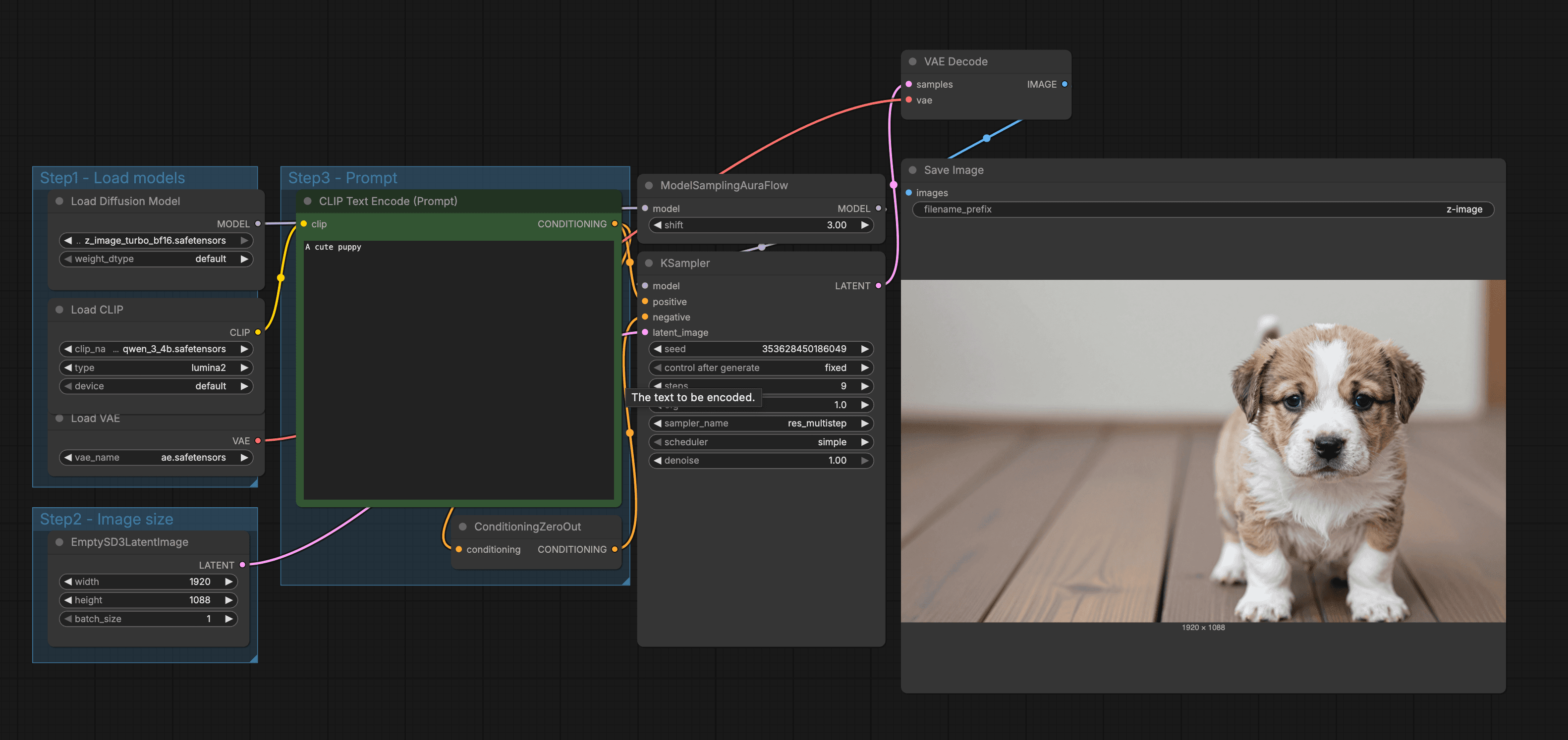
Color helps the reader distinguish payloads, but it is the socket type that matters to execution. The prompt itself does not travel into the sampler as a sentence. The text encoder turns it into conditioning tensors first. The sampler returns a latent tensor, not a visible puppy. Only the VAE decode node turns that latent into RGB pixels.
Two JSON views of the same workflow
ComfyUI can represent a workflow in more than one JSON shape. The saved canvas format preserves editor details such as node positions, sizes, groups, links, and widget values. That is the version meant to reconstruct what a person sees.
The API prompt format is smaller and execution-focused. It is a dictionary keyed by node ID. Each entry names a node class and its inputs. A connected input is encoded as a two-item array containing the upstream node ID and output index.
{
  "43": {
    "class_type": "VAEDecode",
    "inputs": {
      "samples": ["44", 0],
      "vae": ["40", 0]
    }
  },
  "44": {
    "class_type": "KSampler",
    "inputs": {
      "seed": 353628450186049,
      "steps": 9,
      "cfg": 1,
      "sampler_name": "res_multistep",
      "scheduler": "simple",
      "model": ["47", 0],
      "positive": ["45", 0],
      "latent_image": ["41", 0]
    }
  }
}
Here, ["44", 0]means "take output zero from node 44." Node IDs are identifiers, not line numbers. Their numeric order does not define the run order.
What survives when the canvas disappears
How the graph executes
ComfyUI validates the submitted graph, identifies requested output nodes, and follows their dependencies upstream. If the output is a saved image, the save node needs pixels. Those pixels come from VAE decode. VAE decode needs a sampled latent and a VAE. The sampler needs a model, conditioning, and a starting latent.
That gives the executor a dependency order:
1. Load model
2. Load text encoder
3. Load VAE
4. Encode prompt
5. Create latent canvas
6. Run sampler
7. Decode latent to image
8. Save image
The visual layout does not have to be left-to-right. The real order comes from edges and data dependencies, not the physical position of the boxes. Independent branches may be eligible to run without depending on each other. Cycles generally do not describe a valid feed-forward generation graph because a node would ultimately require its own unavailable output.
This output-driven structure is why a disconnected node can sit on the canvas without doing work. It is also why moving a box, changing its color, or rearranging a group should not alter the image. Those edits change presentation, not the execution graph.
What ComfyUI actually reuses
ComfyUI checks whether a node's inputs and relevant change signals still match a cached result. If they do, downstream execution can reuse the output. A custom node can influence this through change detection, so caching is a property to verify, not a promise that every unchanged-looking node is free.
We submitted the same 768 by 432 Z-Image-Turbo puppy graph to a warm ComfyUI test server three times. This is a cache demonstration on one machine, not a performance benchmark.
| Submission | Observed time | Reused | Executed |
|---|---|---|---|
| Warm run | 4.202 s | Model, sampling patch, text encoder, prompt conditioning, zeroed conditioning, and VAE | Latent creation, sampling, decode, and save |
| Exact repeat | 0.102 s | Every computational node | No image computation |
| Save prefix changed | 0.102 s | Nodes through VAE decode | Save Image only |
The exact repeat did not denoise the puppy again. It reused the prior outputs. Changing only the filename prefix invalidated the save node while preserving the generated pixels. By contrast, changing the prompt, seed, sampler, scheduler, model, or latent size should invalidate the affected path and everything downstream from it.
The environment, workflow controls, and observed cache sets are recorded in the cache audit.
Read timings carefully
Why creative tools love nodes
Node graphs are especially strong when the work is technical and visual at the same time. Creative AI, 3D, compositing, audio, automation, shaders, and game logic all share a useful property: the user wants to try many small changes without rebuilding the whole system.
Nodes help because they support creative iteration:
- You can swap a node without rewriting the whole workflow.
- You can branch one output into two experiments.
- You can compare paths side by side.
- You can group a repeated pattern into a reusable component.
- You can keep complex logic visible for review.
Workflow intuition
Other tools that use this idea
ComfyUI is part of a long lineage of node-based and flow-based software. The domains differ, but the pattern is the same: boxes represent operations, edges represent data or control, and the graph becomes a program.
| Tool | Domain | Similarity to ComfyUI |
|---|---|---|
| Node-RED | Automation and event-driven applications | Flows are built by wiring nodes that process messages. |
| Blender Geometry Nodes | Procedural 3D modeling | Geometry is created and modified through connected node operations. |
| Unreal Engine Blueprints | Game logic and gameplay scripting | Gameplay behavior is created through a node-based scripting interface. |
| Houdini | Procedural VFX, geometry, simulation, and rendering | Scenes are built from nodes organized into networks. |
| TouchDesigner | Realtime multimedia and installations | Operators are nodes that output data to other operators. |
| Nuke | Film and television compositing | Image-processing operations form a dependency graph that ends at a viewer or write node. |
| DaVinci Resolve Fusion | Compositing, motion graphics, and VFX | Tools are connected into a flow that transforms media into a final output. |
| n8n | Business automation and AI workflows | Workflows are collections of connected nodes that automate a process. |
The difference is the payload. ComfyUI often moves models, latents, images, masks, conditioning, and video frames. Node-RED might move messages. Blender might move geometry. Houdini might move geometry, images, channels, tasks, or USD data. The visual grammar remains familiar.
The limits of node graphs
Node graphs are powerful, but they are not automatically simpler than code. A large graph can become hard to read if it has crossing edges, repeated logic, unnamed groups, and hidden state.
The main failure modes are predictable:
- Graphs can become visually messy faster than text code.
- Copying node groups can create duplicated logic that is hard to update later.
- Some state is hidden in widgets, dropdowns, file paths, and seed values.
- Versioning a visual graph can be harder than reviewing a small code diff.
- Custom nodes can hide complex or risky code behind a friendly box.
- A screenshot can hide model versions, file hashes, extension versions, and widget values.
The best node workflows are documented like code. They use clear groups, meaningful names, stable inputs, saved examples, and small reusable components.
A good rule of thumb: use nodes when the workflow benefits from visual inspection, branching, reusable inputs, and quick experimentation. Use ordinary code when the logic is mostly text, heavily tested, versioned by diff, or easier to review as a compact function.
Safety, reproducibility, and debugging
A custom node is executable software. Installing one is closer to installing a Python package than importing a harmless visual preset. It may read files, access the network, load native libraries, or write output. Use trusted repositories, inspect install scripts and dependencies, pin versions, and do not place secrets in workflow values.
A reproducible workflow needs more than its graph. Record the ComfyUI version, custom-node commits, model filenames or hashes, text encoder and VAE, prompt, seed, dimensions, sampler, scheduler, step count, guidance, denoise value, and relevant environment details. A matching seed cannot compensate for a different model or implementation.
| Symptom | Check first | Why |
|---|---|---|
| Sockets will not connect | Input and output types | An IMAGE, LATENT, MODEL, and CONDITIONING value are different payloads. |
| Red or missing node | Custom-node package and version | The workflow names a class that this server cannot register. |
| Model not found | Model path, filename, and model category | A loader searches configured folders for a specific resource type. |
| Tensor shape error | Batch size, dimensions, masks, and model family | The socket type can match while the tensor's internal dimensions do not. |
| Unexpected cached result | Changed inputs, seed mode, and custom change detection | Visible widget state and backend cache invalidation can disagree. |
| Graph runs but no file appears | Connected output node, output path, and server logs | A preview is not always a persisted output, and disconnected branches do not run. |
Debug from the output backward
Why this matters for AI workflows
AI generation is not one operation. It is a chain of decisions: which model, which prompt encoder, which reference image, which latent size, which sampler, which scheduler, which postprocess step, which save format, and which branch becomes the final output.
A chat box is excellent for quick intent. A node graph is excellent for production control. It lets the user see the actual mechanism, preserve it, edit it, and share it. That is why ComfyUI has become so useful for people who want to understand and control generation rather than only ask for a result.
The useful mental model
Sources
This article uses official documentation where possible, because node-based tools use similar words in slightly different ways.
- ComfyUI custom node properties for Python node classes, input types, return types, function names, and caching behavior.
- ComfyUI workflow concepts for the relationship between nodes, links, workflow structure, and execution.
- ComfyUI server messages for execution state and the nodes reported as cached.
- Node-RED concepts for nodes, flows, messages, wires, and the browser workspace model.
- Blender Geometry Nodes manual for procedural geometry work through nodes.
- Unreal Engine Blueprints documentation for node-based gameplay scripting in Unreal Editor.
- Houdini networks and parameters for nodes as scene building blocks organized in networks.
- TouchDesigner operator documentation for operators as nodes that output data to other operators.
- n8n workflow documentation for workflows as connected nodes used to automate a process.
- Foundry Nuke node graph documentation for image-processing nodes connected into a compositing tree.
Keep reading
Related articles
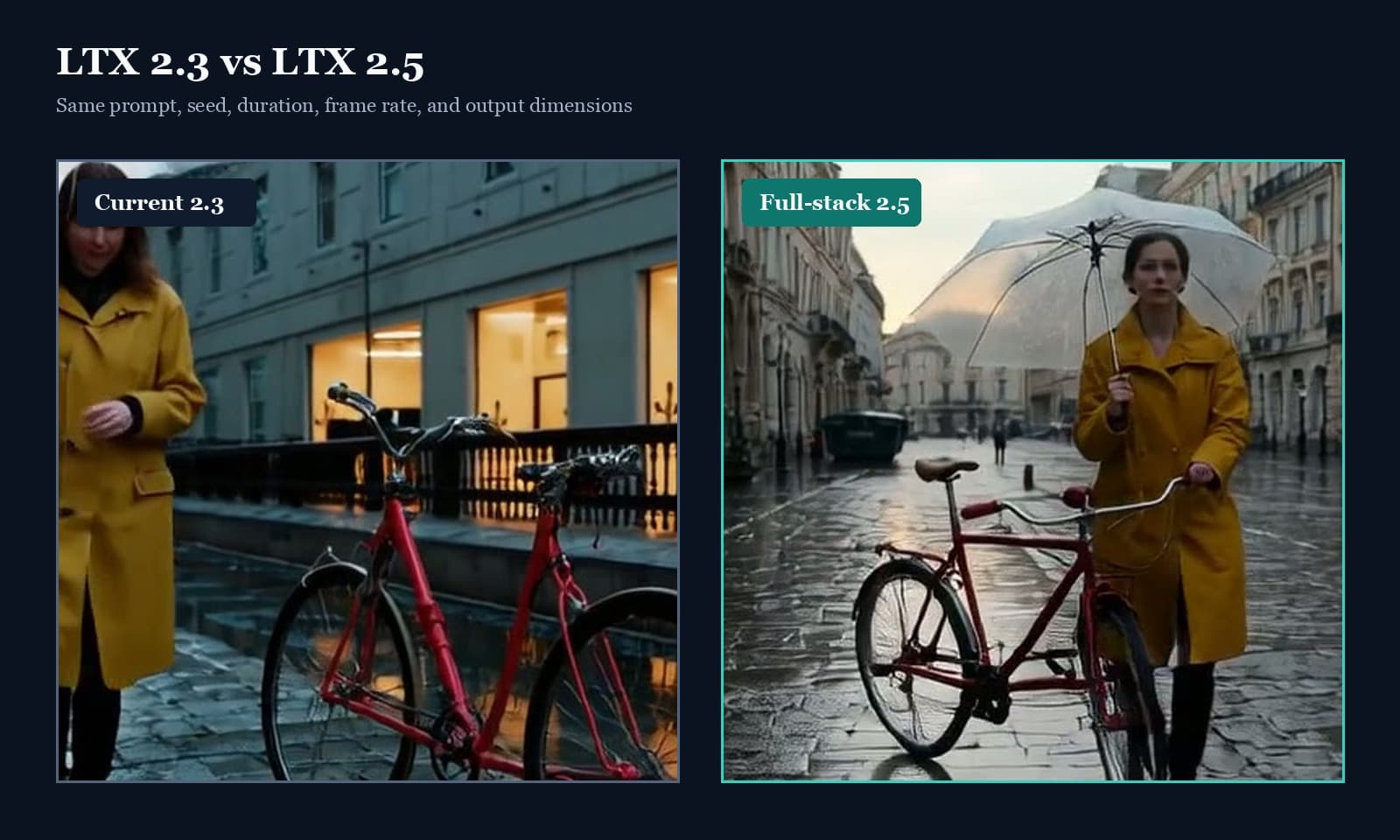
LTX 2.5 vs LTX 2.3: What Actually Improved
A visual LTX 2.5 and LTX 2.3 comparison covering prompt adherence, timed scenes, runtime compatibility, native audio, and practical upgrade limits.
From Prompt to Puppy: How AI Image Generation Works
Learn how an AI image model is trained, how prompts become embeddings, what latent space means, and how samplers turn noise into a final image.